Custom Subject Strategies · Configurable by Design
COMPOSABLE STRATEGY WORKSPACE

Move beyond presets.Build a strategy you can test.

Compose trend, turning-point, volatility, stop, and position-management logic—then gate first entry by trend state, market phase, and the Nth independent trigger.
Save a revision, backtest it, refine it with evidence-aware AI prompts, then observe its lifecycle in simulated trading.

10Named strategy slots
5+3Core settings + entry gates
1:1Version-to-test integrity
SIMSimulated lifecycle
THE REAL WORKSPACE

Ten slots are not ten canned answers.
They are ten versioned strategy experiments.

Every slot carries its own name, revision, status, and individual-backtest entry point. Create candidates first, then retain, refine, or discard them through comparable evidence.
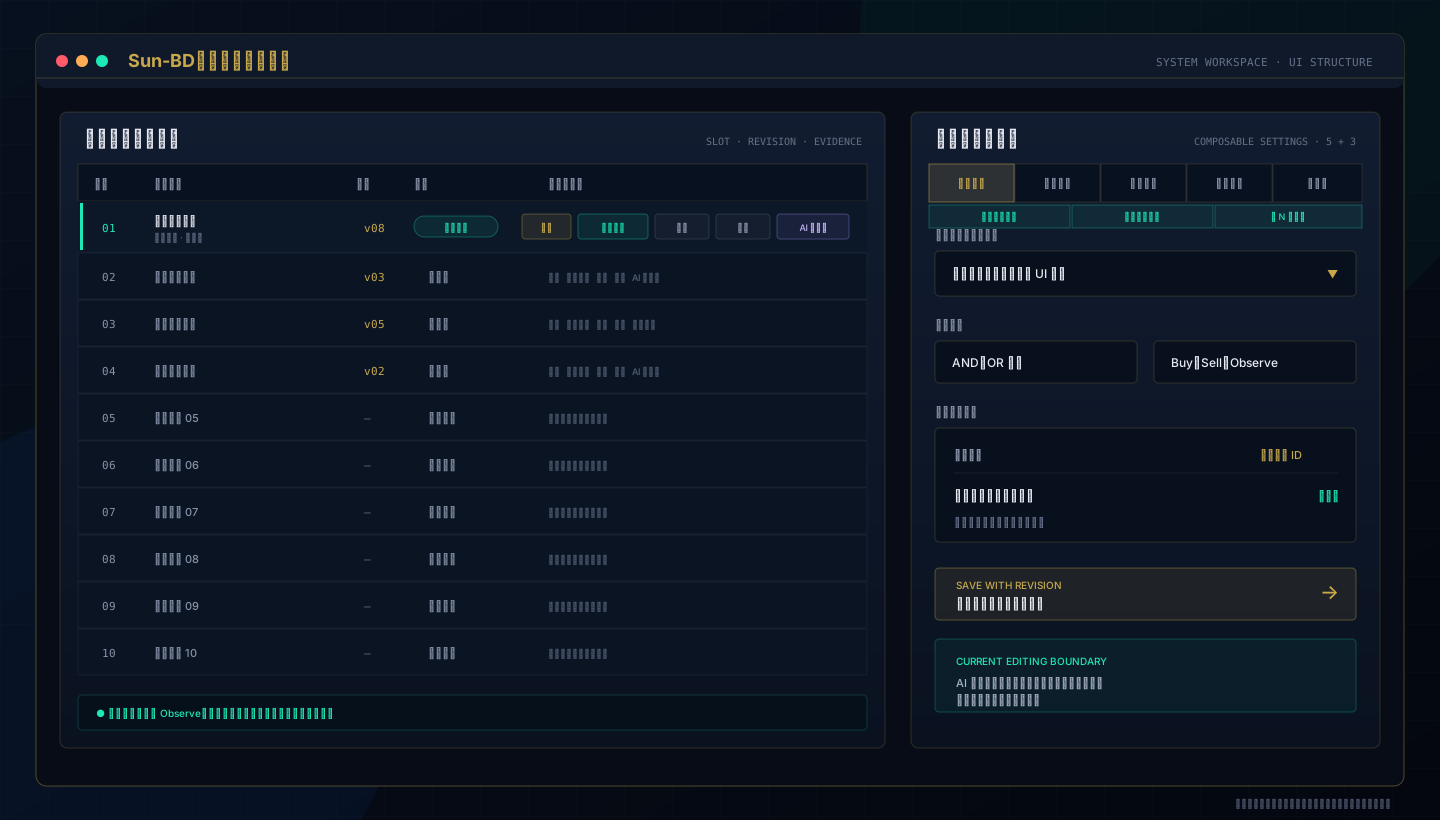
Custom subject strategy workspace with ten slots, five core setting pages, three first-entry pages, individual backtests, differences, reports, and AI prompt access
Interface illustration redrawn from the implemented workflowNo member data or actual performance
CUSTOM-BUILT, EVIDENCE-LED

Upgrade from “pick a theme” to
build, test, and refine

The new center of gravity is a stated strategy hypothesis expressed in real controls—not guessing which preset happens to fit today.

01 · IDENTIFY

Ten named strategies

Separate horizons, ideas, and research tracks so settings do not blur together.

  • Slots 01–10 remain visible
  • Name, revision, and state in one view
02 · COMPOSE

Eight explicit setting pages

Five core pages manage strategy and position logic; three new pages control flat first entry.

  • Trend, turning, volatility, stops, entry/exit
  • Trend state, market phase, trigger count
03 · VERSION

Saved revision integrity

Changes create a new revision. Backtest and AI-analysis paths verify the current version before using evidence.

  • A saved strategy becomes the baseline
  • Revision and fingerprint checks
04 · BACKTEST

Individual tests, diffs, reports

Replay a selected strategy and retain comparable aggregate and trade-level evidence.

  • Win rate, net P&L, PF, MaxDD
  • Trades, costs, and cohort stability
05 · AI LOOP

Two structured AI prompts

Start with UI-ready candidates, then let the latest backtest evidence frame the next controlled improvement.

  • Complete TXT instead of a hand-written mega-prompt
  • AI never writes settings or starts trading
06 · SIMULATE

Simulated Trading

After configuration, observe entry-to-exit behavior without sending a live broker order.

  • Independent simulated position state
  • Entry, scaling, stops, targets, and exits
SIX CONTROLLED STEPS

Clear inputs. Traceable evidence. Controlled changes.

A strategy is not finished with one click. It becomes useful when the process is repeatable and every revision can be explained.

STEP 01

Choose and name a slot

Give each research objective an independent identity.

STEP 02

Compose five core settings and three entry gates

Select implemented decision, position, and first-entry controls.

STEP 03

Save a strategy revision

Create the traceable baseline for tests and comparisons.

STEP 04

Run an individual backtest

Collect the strategy’s statistics, report, and trade evidence.

STEP 05

Analyze and re-test with AI

Use the latest evidence to propose before-and-after changes.

STEP 06

Observe in simulation

Review the trading lifecycle without sending live orders.

FIVE CORE PAGES + THREE FIRST-ENTRY PAGES

Five core setting pages plus three first-entry gates

Every choice maps to an implemented control. The three new pages affect flat first entry only; they do not rewrite reverse closing, stop/target exits, or later scaling actions.

Trend DirectionDefine the dominant direction, timeframe roles, and decision relationships.
Turning StrategyDescribe reversal, exhaustion, or structural-transition conditions.
Volatility RiskMake volatility state and risk filters part of entry eligibility.
Stop ManagementSelect static or dynamic modes and their implemented options.
Entry / ExitConfigure loss/profit scaling in and scaling out independently.
Trend StateUse RegimeDetector on HighFrequency, Hourly, or Daily to gate first-entry direction.
Market PhaseChoose a timeframe and one canonical EnglishName that must match at entry.
Trigger CountRequire an independently re-triggered condition to reach the Nth event before admission.
Explicit beats mysterious: the system saves executable options, operators, and thresholds. AI candidates are also constrained to the same UI inventory, reducing suggestions that cannot be applied.
THREE NEW FIRST-ENTRY CONTROLS

Do not enter just because a signal is true.
Confirm direction, phase, and independent re-triggers.

Each gate can be switched on or off. Every enabled gate must pass—and the full theme must still agree in the same Buy or Sell direction—before a flat first entry is admitted.

01

Trend-direction gate

Select HighFrequency, Hourly, or Daily. RegimeDetector admits Strong Buy/Buy or Strong Sell/Sell. Weak states, Observe, missing data, and unknown values fail closed.

REGIMEDETECTOR · FAIL CLOSED
02

Market-phase gate

Select HighFrequency, Hourly, or Daily and exactly one canonical EnglishName for that timeframe. The phase decides admission; it never manufactures a Buy or Sell direction.

MARKETTYPEANALYSIS · EXACT ENGLISHNAME
03

Enter on the Nth trigger

Set a target from 2–20. Count the whole theme or an AND group of 1–3 technical values. A continuously true condition does not count again; it must go false and then become true independently.

FALSE → TRUE · INTERVAL 1–480 MIN · WINDOW UP TO 10080 MIN
FIRST-ENTRY ADMISSION FLOW
Full theme agrees on directionExisting trend, turning, and volatility logic first returns Buy or Sell
Trend state + market phaseOnly enabled gates are evaluated; any mismatch means wait
Nth independent triggerThe same row cannot recount; a direction change resets the old-direction count
Consume one first-entry admissionStops, targets, and later scaling remain under the original settings
Important boundary: expiration does not bypass the false → true requirement. When 1–3 technical values are the count source, the entire theme must still agree in the same direction on every count. Live evaluation and Custom Subject replay use the same evaluator and state rules.
BACKTEST EVIDENCE

A backtest is more than one win-rate number

An individual test binds strategy identity, revision, and trade evidence. Once settings change, an older run is not accepted as the evidence source for the current revision.

01Verify the selected slot’s saved revision and source fingerprint.
02Use only that slot’s latest individual run—not another strategy.
03Review signals, fills, costs, net P&L, and cohorts together.
04Re-test with the same data range and common method after a change.
VERSION

Matching revision

A revision or fingerprint mismatch requires a fresh test.

LATEST

Latest evidence

Older runs and other slots are not blended into the conclusion.

DETAIL

Full trade cycles

Preserve the chain from entry through scaling to complete exit.

COMPARE

Comparable review

Use the same acceptance metrics to judge whether a change helped.

TWO AI TOOLS · ONE PAGE

Not sure where to begin? Let the system build the complete AI prompt.

AI Strategy Recommendation produces three UI-ready candidate sets. AI Backtest Analysis then frames the latest trade evidence and demands precise before → after changes, creating a repeatable refinement loop.

01 Choose a 5–30 minute, 1–2 hour, or 1–2 day horizon
02 Export a complete TXT containing real UI options
03 Generate an analysis TXT after an individual backtest
04 Review, configure, save, and re-test manually
SIMULATED TRADING · CORE VALIDATION

Configured does not have to mean live.
Observe the full lifecycle in simulation first.

Simulation follows strategy decisions and position-management flows without calling the live broker order path. It lets you inspect how signals become simulated position state and transaction records.

01 · ENABLE

Enable simulation explicitly

Turn on simulated trading in settings; its state is displayed separately from live trading.

02 · OBSERVE

Follow strategy signals

Update an independent simulated position from the current deal price without creating a broker position.

03 · MANAGE

Exercise the lifecycle

Track first entry, additions, reductions, stop/target exits, closing, and forced liquidation state.

04 · REVIEW

Inspect transaction records

Simulated transaction evidence is shown in the transaction UI for process review.

Simulation is not live execution: simulated records use the system’s current market price and independent position logic. They do not reproduce every queue, fill, slippage, or connectivity condition, and they do not predict future performance.
CLEAR OPERATING BOUNDARIES

Powerful tools require clear boundaries

AI is a candidate, not an orderPrompts and AI responses never write into the system, save a strategy, or start trading.
Backtests study historical dataResults depend on data, period, costs, and assumptions. Past performance does not predict future results.
Simulation is not a live fillNo live broker order is sent, so simulation cannot equal real matching, slippage, or connectivity outcomes.

Turn a trading idea into a testable strategy revision

Build first, backtest next, use AI to organize candidates and evidence, then observe the process in simulation. You control every step.